

Plugin Picks – New, Updated and Cool Plugins to Enhance WordPress Sites
- February 3, 2012
- Plugins
In this Plugin Picks we look at new security plugins. While WordPress takes security very seriously (making constant improvements, monitoring/culling entries in the Repository and notifying WordPress hosts of updates in real time), there are always going to be situations and users that call for special measures.
Below are three recently released plugins which expand WordPress’s security features, options and settings.
 No Soup Plugin: If you want to block certain sections of the internet, companies, countries or specific users, you can specify the different IP addresses or IP blocks and where to send them and this plugin will take care of the rest.
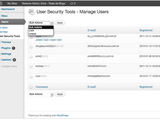 User Security Tools Plugin: User Security Tools provides some improvements to security in WordPress by stopping brute force, enhancing password policy, password reset and password history.
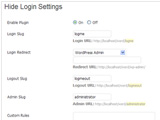 Hide Login Plugin: This plugin allows you to create custom URLs for logging in, logging out, administration and registering for your WordPress site. You could also enable “Hide Mode” which will prevent users from being able to access ‘wp-login.php’ directly.
Plugins
Ever wished a piece of software had just one more feature to make it perfect for your needs? WordPress gives you that option. Instead of trying to stuff every conceivable feature into their releases, WordPress focuses on providing a solid, community perfected platform that is EXPANDABLE. Drawing upon millions of users and thousands of developers, Plugins are custom modules that can be added to an existing WordPress installation to completely change existing WordPress features or add brand new ones.
Need help implementing this plugin in your WordPress site? Contact us for our professional services. We can also provide support & expertise in convenient “blocks” to suit your short and long term needs.
I'm the front-man of It's WordPress. I come from a diverse array of backgrounds, enjoying the opportunity to expand my knowledge base and skill set by re-inventing myself. I enjoy environments that focus on emerging information, technology and concepts. I put on the technical hat in my early 20s and never really looked back. I'm love technology and the internet, as well as the outdoors and avidly hike, kayak and camp every chance I get.
About Us
We can take you from concept, through design, development and deployment in one seamless process. Whether you choose a self-managed web site or need a continuing support relationship; we've got you covered.
Click to edit this heading
Request Consulation
Ready to transform your vision into a reality? Just looking to see what it takes to get the ball rolling. Tell us about your project and we can help. No spam. No obligation. Just answers.
More from our blog
See all posts




Recent Posts
- WordPress Workflow With Rest API November 9, 2017
- Three Must-Haves For Your WordPress Headlines January 23, 2016
- Hail to the King (of Content Management Systems)! November 10, 2015
All Website Tags
Leave a Comment cancel
This site uses Akismet to reduce spam. Learn how your comment data is processed.